What is Pop!_OS?
Pop!_OS: The Complete Guide to System76’s Revolutionary Linux Distribution
What is Pop!_OS? Understanding This Game-Changing Linux Distro
Pop!_OS is a powerful, free, and open-source Linux distribution professionally developed by System76, a Colorado-based computer manufacturer with over 20 years of experience in shipping Linux computers. First released in October 2017, Pop!_OS has rapidly evolved into one of the most popular Linux distributions, earning particular acclaim among software developers, content creators, and gaming enthusiasts worldwide.
What sets Pop!_OS apart from community-driven distributions is its professional development approach. System76’s dedicated engineering team continuously refines the operating system to deliver exceptional productivity and performance. Built on the solid foundation of Ubuntu LTS (Long Term Support), Pop!_OS enhances the Ubuntu experience with custom optimizations, superior hardware support, and innovative features that eliminate workflow obstacles.
The distribution gained significant attention in December 2024 with the release of Pop!_OS 24.04 LTS, which introduced the groundbreaking COSMIC desktop environment—a completely custom interface built from the ground up using the Rust programming language.
The Revolutionary COSMIC Desktop Environment: A New Era for Linux
Built from Scratch with Rust
The COSMIC (Computer Operating System Main Interface Components) desktop environment represents a monumental achievement in Linux desktop development. After three years of intensive development, System76 released COSMIC Epoch 1 as part of Pop!_OS 24.04 LTS, marking the first stable release of this entirely Rust-based desktop environment.
Rust, a memory-safe programming language that has gained tremendous traction in the Linux community, provides COSMIC with exceptional performance, stability, and security. Unlike traditional desktop environments built on older technologies, COSMIC leverages modern development practices to create a responsive, efficient user experience.
The COSMIC desktop uses the Iced toolkit for its interface components, allowing developers to build apps, applets, and even shell components using the same language and framework. This modular approach makes COSMIC highly customizable and developer-friendly.
Wayland-Only Architecture for Modern Graphics
COSMIC is built exclusively for Wayland, the next-generation display protocol that has replaced the aging X11 system. This Wayland-only approach delivers several compelling advantages including smooth graphics rendering, superior multi-monitor support, dynamic resolution scaling, and enhanced security through display server isolation.
The Register’s testing revealed that COSMIC is one of the first desktop environments to truly deliver on Wayland’s promises, handling changing resolutions, orientations, and scaling factors seamlessly without any issues.
Familiar Yet Fresh User Interface
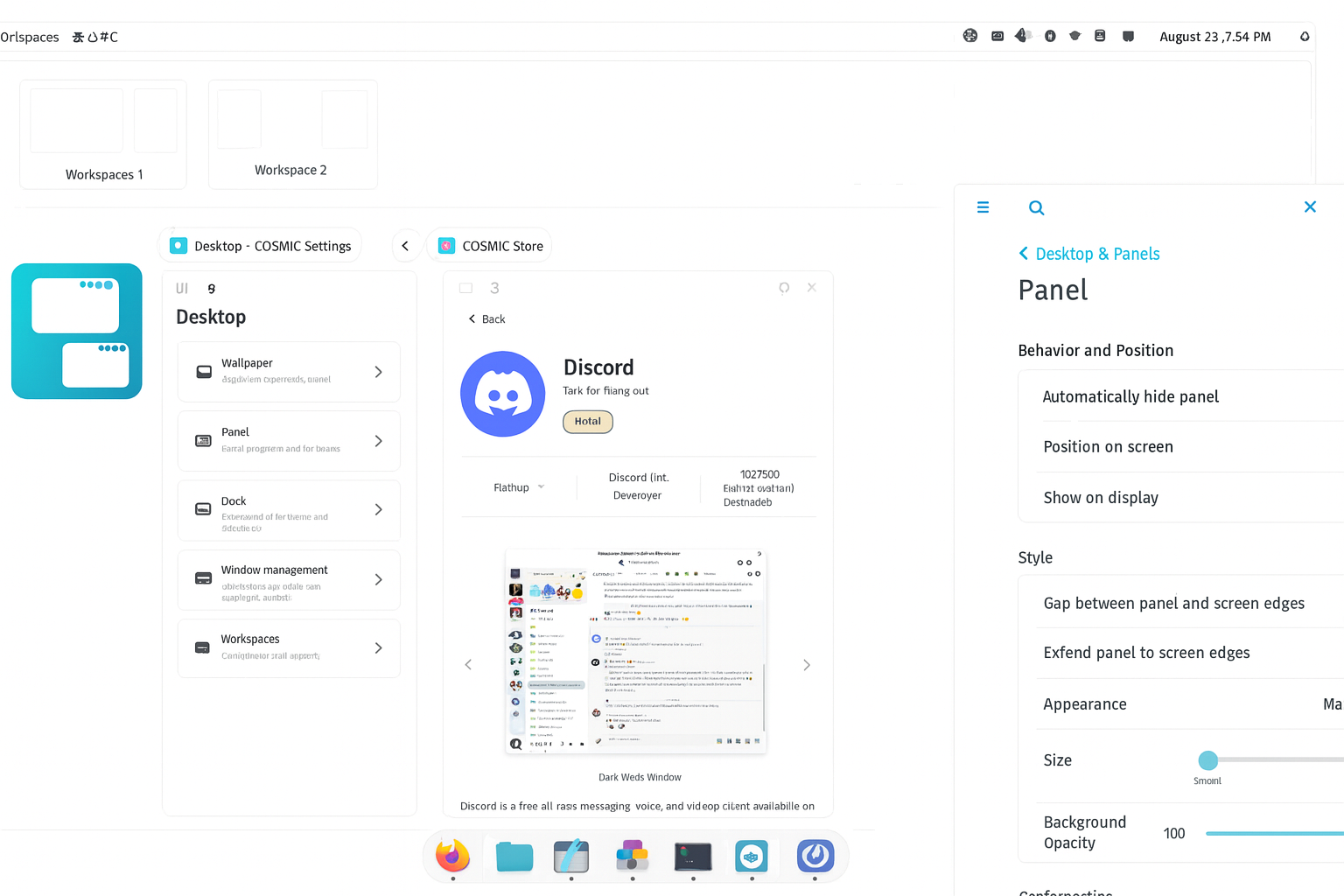
Despite being completely new, COSMIC maintains a familiar layout that makes transitioning from other operating systems straightforward. The interface features a clean panel across the top, a customizable dock for favorite applications, an intelligent launcher for quick app access, and dynamic workspace management.
Users of Pop!_OS 22.04 will find the layout instantly recognizable, but with significant refinements in performance and customization options. The desktop includes essential applets for network connections, sound control, Bluetooth management, power and battery monitoring, and system notifications.
Unprecedented Customization Capabilities
Configurability stands as one of COSMIC’s core design principles. System76 engineered the desktop environment to empower users to create custom layouts that match their specific workflow needs. Panel positions, dock behavior, workspace configurations, color schemes, icon sets, font selections, spacing and density, and border radius can all be fine-tuned without writing a single line of code.
The custom theming system allows organizations and users to create personalized themes using their own color palettes while maintaining readability and accessibility standards. This flexibility makes COSMIC suitable for everything from personal workstations to enterprise deployments.

Intelligent Auto-Tiling: Boost Your Productivity Exponentially
One of Pop!_OS’s most celebrated features is its sophisticated automatic window tiling system. With a single keystroke, you can activate tiling mode, which intelligently arranges your open windows in an organized grid pattern. This feature dramatically enhances productivity for users who regularly work with multiple applications simultaneously.
The tiling functionality is workspace-aware and display-aware, meaning it works independently on each workspace and across multiple monitors. You can have floating windows on one workspace while maintaining a perfectly tiled arrangement on another, providing ultimate flexibility in how you organize your work.
The system includes comprehensive keyboard shortcuts for resizing windows, moving them between positions, switching focus, and rearranging layouts—all without touching your mouse. This keyboard-centric workflow transforms how power users interact with their operating system, significantly reducing the time spent managing windows.
For developers who need to view code editors, documentation, terminals, and browsers simultaneously, or content creators juggling timeline editors, preview windows, and asset libraries, the auto-tiling feature becomes indispensable.
Exceptional GPU Support: Gaming and Graphics Power
Separate ISOs for Optimal Performance
Pop!_OS takes a unique approach to graphics support by offering separate ISO downloads for different GPU configurations. The Intel/AMD ISO is optimized for systems with integrated or discrete AMD graphics cards, while the NVIDIA ISO comes pre-configured with proprietary NVIDIA drivers.
This separation ensures optimal driver installation from the first boot, eliminating the notorious difficulties Linux users have traditionally faced when installing NVIDIA drivers manually. Pop!_OS 24.04 LTS ships with NVIDIA 580 series drivers and Mesa 25.1 graphics drivers, providing cutting-edge support for the latest hardware.
Intelligent Hybrid Graphics Management
Laptop users benefit tremendously from Pop!_OS’s advanced hybrid graphics support. The system intelligently switches between power-saving integrated graphics and performance-oriented discrete GPUs based on application demands, eliminating the need for manual mode switching.
The battery applet displays which applications are currently using the discrete GPU, along with a helpful reminder that discrete GPU usage reduces battery life. Users can also manually specify which GPU an application should use by right-clicking its icon in the launcher.
Gaming Performance That Rivals Windows
Recent benchmarks conducted by Tom’s Hardware and ComputerBase demonstrated that Pop!_OS and other gaming-focused Linux distributions can actually outperform Windows 11 in gaming scenarios. These tests, which used Valve’s Proton compatibility layer to run Windows games on Linux, showed competitive or superior frame rates across multiple AAA titles.
The System76 Scheduler, a custom scheduling service included in Pop!_OS, optimizes CPU resource allocation by giving priority to the currently focused window and its sub-processes. This results in higher frame rates, reduced frame time jitter, and improved overall smoothness during gaming sessions.
Users report that VR gaming experiences are particularly smooth on Pop!_OS, with the scheduler improvements providing noticeable benefits in demanding virtual reality applications.
Native COSMIC Applications: Speed Meets Functionality
Pop!_OS 24.04 LTS includes a suite of custom COSMIC applications built in Rust that replace traditional GNOME counterparts. These applications are designed to be fast, lightweight, and deeply integrated with the COSMIC desktop environment.
COSMIC Files provides an intuitive file management experience with quick navigation, search functionality, and modern features that make organizing documents and media straightforward.
COSMIC Store serves as your central software hub, providing access to Ubuntu 24.04 LTS repositories, Pop!_OS packages, Flathub applications, and a dedicated COSMIC Flatpak repository. The store supports both APT packages and Flatpak applications, giving users maximum software choice.
The COSMIC Terminal offers a powerful command-line interface with customization options including themes, fonts, and layout preferences, making it ideal for developers and system administrators.
Meanwhile, the COSMIC Text Editor brings practical features such as git integration for viewing status and tracking changes, a revert‑all‑changes function for quick recovery, Vim keybindings for efficiency enthusiasts, a tree view for project navigation, and comprehensive theme support.
For media playback, the COSMIC Media Player delivers a clean, distraction‑free interface that keeps the focus on the content.
Finally, the COSMIC Screenshot tool provides quick and easy screen capture with built‑in annotation capabilities.
These applications demonstrate exceptional responsiveness and performance, leveraging Rust’s efficiency to provide smooth user experiences even on modest hardware.
Pop!_OS vs Ubuntu: Understanding the Key Differences
While Pop!_OS is based on Ubuntu 24.04 LTS and maintains compatibility with Ubuntu packages, several significant differences make it a distinct operating system.
Desktop Environment
The most obvious difference is the desktop environment. While Ubuntu ships with standard GNOME Shell (or various flavors with different desktops), Pop!_OS 24.04 LTS features the custom COSMIC desktop environment, providing a fundamentally different user experience with unique productivity features.
Package Management Philosophy
Pop!_OS deliberately avoids Ubuntu’s Snap packaging system by default, which has proven controversial in the Linux community due to performance concerns and centralization issues. Instead, Pop!_OS offers software through traditional APT packages and Flatpak support through the COSMIC Store, giving users more control over their software installation methods.
Performance Optimizations
The System76 Scheduler reduces application latency and improves responsiveness beyond what stock Ubuntu offers. Users consistently report that Pop!_OS feels noticeably snappier during daily use, with applications launching faster and system operations completing more quickly.
Gaming-Specific Enhancements
Pop!_OS includes pre-configured GPU drivers, gaming-focused kernel optimizations, and compatibility layers like Steam and Lutris available immediately after installation. This gaming-ready approach makes Pop!_OS one of the best Linux distributions for gamers who want to start playing without extensive configuration.
Recovery and Refresh Features
Pop!_OS includes a dedicated recovery partition that enables booting into a live environment for troubleshooting without requiring a USB drive. The new Refresh feature allows users to reinstall the operating system while preserving their files, settings, and Flatpak applications—a safety net that makes system recovery dramatically easier.
System Requirements: Runs on Modern and Legacy Hardware
Pop!_OS maintains relatively modest hardware requirements, making it accessible to a wide range of systems from older machines to cutting-edge workstations.
Processor: 64-bit Intel or AMD processor (ARM64 also supported for devices like the System76 Thelio Astra)
Memory: 4 GB RAM recommended for comfortable multitasking (2 GB minimum for basic usage)
Storage: 16 GB recommended, though 20 GB provides more comfortable headroom for applications and updates
Graphics: Compatible with Intel integrated graphics, AMD Radeon cards, and NVIDIA GeForce/Quadro/Tesla GPUs
Display: Any resolution supported, with excellent multi-monitor capabilities
The Linux 6.17 kernel included in Pop!_OS 24.04 LTS provides extensive hardware support, ensuring compatibility with both legacy devices and the latest PC components.
Who Should Choose Pop!_OS? Ideal User Profiles
Software Developers and Engineers
Pop!_OS excels as a development platform with pre-installed development tools, exceptional terminal integration, and easy access to programming language packages and frameworks. The auto-tiling window manager proves particularly valuable for developers who need to simultaneously view code editors, documentation browsers, multiple terminals, and application previews.
Recent versions include streamlined setup for TensorFlow and CUDA, making Pop!_OS an outstanding choice for data scientists, machine learning engineers, and AI researchers who need GPU acceleration for training models.
Content Creators and Digital Artists
Video editors, graphic designers, 3D artists, and digital content creators benefit from Pop!_OS’s superior GPU support, performance optimization, and stability during resource-intensive operations. Applications like Blender, DaVinci Resolve, GIMP, and Inkscape run smoothly on the platform.
The hybrid graphics support ensures laptop creators can balance performance with battery life, automatically engaging discrete GPUs only when rendering or processing demands require it.
Gamers and Esports Enthusiasts
With native Steam integration, comprehensive GPU driver support, Proton compatibility layer for Windows games, and gaming-focused scheduler optimizations, Pop!_OS delivers one of the best Linux gaming experiences available today.
The platform supports both competitive multiplayer gaming with low latency and single-player experiences with maximum graphical fidelity. VR gaming capabilities through SteamVR provide enthusiasts with cutting-edge virtual reality experiences on Linux.
Linux Newcomers and Windows/macOS Switchers
Despite its advanced features, Pop!_OS maintains remarkable beginner-friendliness. The intuitive installer, comprehensive documentation, polished user interface, and familiar desktop paradigms make the learning curve manageable for users transitioning from Windows or macOS.
The distribution strikes an excellent balance between power user capabilities and accessibility, allowing newcomers to start simple while gradually discovering advanced features as they become comfortable with Linux.
System Administrators and IT Professionals
IT professionals appreciate Pop!_OS for its stability, security features, professional development backing from System76, and enterprise-ready capabilities. The predictable LTS release cycle and extensive hardware compatibility make it suitable for deployment across diverse organizational environments.
Installation Process: Simple and User-Friendly
Installing Pop!_OS is remarkably straightforward, even for users new to Linux. The process has been refined to minimize complexity while providing necessary configuration options.
First, download the appropriate ISO image for your hardware from the official System76 website, choosing between Intel/AMD and NVIDIA variants. Create a bootable USB drive using the provided instructions or tools like Balena Etcher or Rufus. Remember to disable Secure Boot in your BIOS/UEFI settings before installation.
Boot from the USB drive to test Pop!_OS in live mode before committing to installation, allowing you to verify hardware compatibility. Follow the installer’s intuitive step-by-step process, selecting your preferred language, keyboard layout, and disk configuration.
Optionally enable full-disk encryption for enhanced security, protecting your data even if your device is physically compromised. Create your user account and set a secure password to complete the installation.
The installer automatically creates a recovery partition, providing a built-in safety net for troubleshooting without needing external media. Within minutes, you’ll have a fully functional operating system ready for customization and use.
Software Management and Application Ecosystem
Pop!_OS provides access to thousands of applications through multiple sources, ensuring users can find the software they need regardless of packaging format.
The COSMIC Store centralizes software management, offering seamless access to Ubuntu 24.04 LTS repositories for traditional APT packages, Pop!_OS custom packages optimized for the distribution, Flathub applications for sandboxed software with automatic updates, and COSMIC-specific apps built for the new desktop environment.
Any software compatible with Ubuntu runs seamlessly on Pop!_OS, including professional development tools, productivity suites, multimedia applications, and specialized scientific or engineering software.
Firmware updates are handled automatically through the system settings, ensuring your hardware remains current with the latest drivers, security patches, and performance improvements. This automation represents a significant advancement in user-friendly Linux administration, eliminating manual firmware management for most users.
Updates and Long-Term Support
Pop!_OS follows Ubuntu’s Long Term Support release cycle, with major versions released approximately every two years. Pop!_OS 24.04 LTS will receive security updates and support until 2027, providing a stable platform for long-term deployments.
The current version is powered by Linux kernel 6.17.9, with continuous kernel updates providing improved hardware support and performance enhancements throughout the support lifecycle.
System updates are flexible and non-intrusive, allowing you to schedule them according to your workflow preferences. The dedicated upgrade tool makes transitioning between major versions straightforward and reliable, with clear instructions and progress indicators.
Users on Pop!_OS 22.04 LTS will receive upgrade notifications starting in January 2026, giving them ample time to prepare for the transition to the COSMIC desktop environment.
The COSMIC desktop environment will receive continuous updates with new features and improvements even after the initial stable release, as System76 maintains active development based on user feedback and evolving technology standards.
Community, Documentation, and Support Resources
While not community-driven like many Linux distributions, Pop!_OS benefits from System76’s professional support infrastructure and comprehensive documentation ecosystem.
System76 provides detailed guides through their support website covering installation procedures, hardware troubleshooting, software configuration, performance optimization, and common issue resolution.
The growing Pop!_OS user base has created numerous community resources including Reddit communities for discussion and problem-solving, YouTube tutorials and review channels, Stack Exchange questions and answers, and GitHub repositories for development and bug reporting.
Users can contribute to Pop!_OS development through GitHub, where the source code is openly available under permissive licenses. The COSMIC desktop environment encourages community participation, with extensive developer documentation for building custom apps and applets.
For System76 hardware customers, professional technical support is available directly from the company, providing expert assistance for both hardware and software issues.
Security and Privacy: Built-In Protection
Pop!_OS takes security seriously with multiple layers of protection built into the operating system.
Full-disk encryption is available during installation, ensuring that only you hold the key to access your computer’s data. The encryption protects against physical theft and unauthorized access, with strong encryption algorithms providing robust security.
The operating system collects zero telemetry or user data, respecting your privacy by default. Unlike some commercial operating systems, Pop!_OS doesn’t track your activities, send usage statistics, or transmit personal information.
Memory-safe code throughout COSMIC reduces vulnerability surfaces by preventing common security issues like buffer overflows and use-after-free bugs. Rust’s compile-time guarantees help eliminate entire classes of security vulnerabilities.
Regular security updates through the Ubuntu security team provide timely patches for discovered vulnerabilities, with automatic update notifications ensuring you stay protected against emerging threats.
ARM Support: Expanding to New Architectures
Pop!_OS 24.04 LTS introduces official ARM64 support, officially supported on the System76 Thelio Astra desktop and providing community support for non-System76 ARM hardware enabled by Tow-Boot.
This expansion brings Pop!_OS’s polished experience to ARM-based systems, opening possibilities for energy-efficient workstations and alternative computing platforms beyond traditional x86 architecture.
Why Choose Pop!_OS in 2026? The Compelling Case
Pop!_OS represents a modern, professionally-developed Linux distribution that successfully balances power user features with newcomer accessibility. The release of the COSMIC desktop environment marks a pivotal moment in Linux desktop evolution, demonstrating that innovation and fresh thinking can still dramatically improve the user experience.
The combination of Rust-based performance, intelligent auto-tiling for productivity, superior GPU support for gaming and creative work, security features that protect without compromising usability, professional development backing from System76, and a completely free and open-source foundation makes Pop!_OS a compelling choice for anyone seeking a productive, reliable operating system.
Whether you’re a developer looking for an efficient coding environment with powerful terminal integration, a creator needing robust multimedia capabilities with excellent GPU support, a gamer wanting seamless Linux gaming experiences that can rival or exceed Windows performance, or simply someone exploring alternatives to proprietary operating systems, Pop!_OS deserves serious consideration.
Best of all, Pop!_OS is completely free to download and use, embodying the freedom and flexibility that defines the best of open-source software. There are no subscription fees, no licensing restrictions, and no artificial limitations on what you can do with your computer.
The continuous development by System76, combined with community contributions and the innovative COSMIC desktop environment, ensures Pop!_OS will continue evolving with new features, performance improvements, and expanded capabilities in the years ahead. This makes it not just a distribution for today, but an investment in a computing future that prioritizes user empowerment, privacy, and open-source principles.
Frequently Asked Questions About Pop!_OS
Is Pop!_OS good for beginners? Yes, Pop!_OS is excellent for Linux beginners due to its intuitive installer, polished interface, comprehensive documentation, and familiar desktop paradigm. The learning curve is manageable for users coming from Windows or macOS.
Can I run Windows applications on Pop!_OS? Yes, through compatibility layers like Wine and Proton. Steam’s Proton integration allows many Windows games to run seamlessly, while Wine enables other Windows applications to function on Linux.
Does Pop!_OS support dual-booting with Windows? Yes, you can dual-boot Pop!_OS alongside Windows, though the process requires careful partition management. The installer provides options for alongside installation, though manual partitioning offers more control.
How does Pop!_OS compare to Ubuntu for gaming? Pop!_OS generally offers better out-of-the-box gaming performance due to pre-configured GPU drivers, the System76 Scheduler optimization, and gaming-focused kernel tuning. Benchmarks show it can match or exceed Ubuntu’s gaming performance.
Will my NVIDIA graphics card work with Pop!_OS? Yes, Pop!_OS provides excellent NVIDIA support with a dedicated ISO that includes proprietary NVIDIA drivers pre-installed, eliminating the common driver installation headaches associated with NVIDIA on Linux.
Can I upgrade from Pop!_OS 22.04 to 24.04? Yes, users on Pop!_OS 22.04 LTS will receive upgrade notifications starting in January 2026. System76 provides a dedicated upgrade tool that makes the process straightforward and reliable.
Is Pop!_OS free? Yes, Pop!_OS is completely free to download, install, and use. There are no licensing fees, subscription costs, or premium versions. It’s open-source software that respects your freedom and privacy.
Getting Started: Download Pop!_OS Today
Ready to experience the future of Linux desktop computing? Visit the official System76 website at system76.com/pop to download Pop!_OS 24.04 LTS with the revolutionary COSMIC desktop environment. Choose the ISO that matches your hardware configuration, create a bootable USB drive, and begin your journey toward a more productive, privacy-respecting computing experience.
Join thousands of developers, creators, gamers, and enthusiasts who have discovered that Pop!_OS offers the perfect balance of power, performance, and usability. The Linux desktop has never looked better or worked more smoothly than it does with COSMIC and Pop!_OS 24.04 LTS.